Career-reusable technology
Learners work with technologies and concepts that remain useful in further study, technical projects and engineering work, rather than in an education-only dead end.
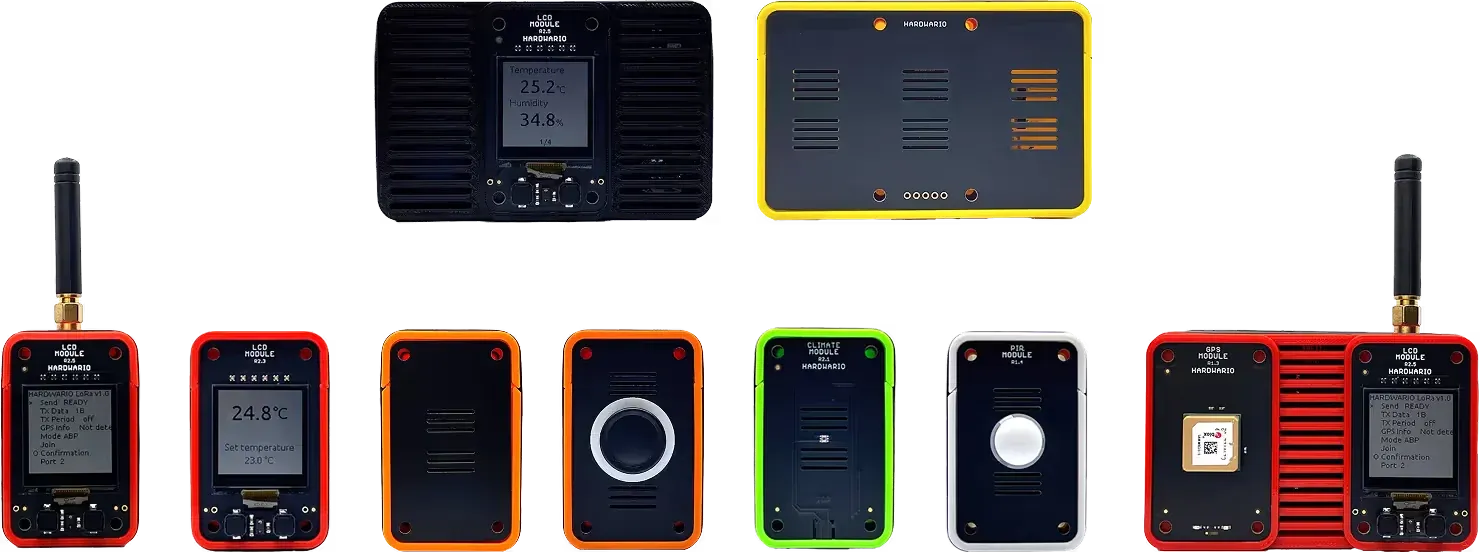
HARDWARIO Academy helps educators take learners from a physical event to a working dashboard through the TOWER stack, using technologies they can meet again in advanced study, internships and engineering careers.
Why HARDWARIO Academy
Learners work with technologies and concepts that remain useful in further study, technical projects and engineering work, rather than in an education-only dead end.
Connect embedded hardware, firmware, radio, messaging, automation, time-series data and visualization so learners can explain how the whole system works.
Start with a guided activity, state the prerequisites, and expose deeper layers progressively. The educator remains in control of the learning goal, timing and supervision.
Define one useful lesson or lab, review the evidence, then expand across classes, subjects, semesters or educator teams when the pilot works.
Who Academy serves
The audience changes the depth, delivery model and next step. It does not change the underlying commitment to authentic IoT learning.
Hands-on lessons, laboratories and projects for informatics, physics, electronics, automation and interdisciplinary STEM.
Practical labs and project foundations for embedded systems, IoT, automation, mechatronics, data engineering and teacher education.
Age-appropriate introductory activities with explicitly adapted depth, duration, tooling, supervision and assessment.
STEM labs, clubs, after-school programs and training providers with a named facilitator, cohort and learning objective.
Schools, universities, regions and funders building a defined program with clear roles, evidence and a route beyond a one-off event.
A project-led, self-service route through the TOWER stack overview and the Store rather than a school sales journey.
The TOWER stack
The TOWER learning path connects eight layers into one coherent system learners can inspect, explain and extend. HARDWARIO Academy grew out of BigClown, the original name of today's HARDWARIO TOWER kit.
Embedded hardware
Learn with a real MCU family and encounter power-constrained embedded design concepts.
Embedded software
Explore modern memory-safe embedded development and asynchronous firmware architecture.
Host tooling
Use inspectable, scriptable developer tooling instead of a closed education-only application.
Device communication
Understand constrained wireless communication and include security in the system model.
Messaging
Move device events through a broadly applicable publish-and-subscribe model.
Flow and integration
Connect messages, logic and services while making system behavior visible.
Time-series storage
Store and query measurements and events as they change over time.
Visualization
Build dashboards and interpret operational data in a professional visualization environment.
Each activity states the layers it covers; we confirm released hardware, curriculum coverage, prerequisites, accounts, local services and support with you before your school or university commits.
Institutional journey
A useful pilot makes the learner, educator, environment and evidence explicit before delivery.
Name the cohort, subject, outcome, timetable, educator and the TOWER stack layers learners should understand or use.
Confirm the released configuration, computers, installation rights, network access, local services, supervision, preparation and support boundary.
Run a scoped lesson or lab, review learner work and educator experience, then decide whether to repeat or expand it.
Learning paths
School path
A pilot lesson, practical lab or project path for a named class and subject.
University path
A lab, coursework or project foundation with deeper access to the TOWER stack.
Adapted path
An explicitly adapted introduction for younger cohorts or facilitated non-formal learning.
Plan with confidence
Academy connects learning goals with current technical truth. Before your class commits, we go through release status, exact prerequisites and curriculum coverage together.
TOWER stack
Review the canonical device-to-dashboard path used for every new Academy learning activity and program brief.
Explore the stackRelease readiness
Every readiness check covers release, configuration, prerequisites and TOWER stack coverage. Ask us about any guide and we confirm what it covers.
Discuss readinessProgram design
Bring a cohort, learning objective and date. We will frame the smallest useful pilot and identify what must be validated.
Plan a pilotCurrent availability
Check the currently listed TOWER components and configurations before planning a self-service build or equipment purchase.
Visit storeIndependent learning
The maker path is self-service, so you can build at your own pace. Pick a project with a stated release, exact configuration, prerequisites and TOWER stack coverage, and you know before you buy exactly what you will build and what it needs. If a guide does not state these, ask before you start.
Frequently asked questions
A trustworthy scope is more useful than a universal promise.
Academy starts with secondary and high schools through practical lessons, labs and projects. University departments can use deeper laboratory and project pathways. Upper-primary and basic schools are welcome when depth, duration, tooling, supervision and assessment are adapted.
STM32 low-power microcontrollers, Rust with Embassy, a Rust CLI host ecosystem, secure sub-GHz radio, MQTT, Node-RED, InfluxDB and Grafana. A specific activity may cover only a subset, and its scope says exactly which layers.
No. A prepared entry activity can hide some complexity, while advanced work progressively exposes Rust/Embassy firmware and Rust CLI tooling. The required depth and prerequisites are agreed for the cohort.
It depends on the activity. The readiness check may include the Rust toolchain and CLI, Node-RED, InfluxDB, Grafana, local services, accounts, network access and installation rights. These requirements are stated before delivery.
Standard classroom activities use low-voltage, solder-free assembly. Normal supervision, age guidance and the requirements of the exact activity still apply; this is not a claim of zero risk.
We confirm availability, curriculum coverage and support for the exact offer you discuss with us. We announce features, dates, certifications and support horizons only once they are verified.
Review the TOWER stack and current Store listings first. Use a self-service project only when it explicitly states its current-stack compatibility, bill of materials, prerequisites, release status and support boundary.
Academy marketing is available in English, Czech, German, Slovak and Polish. Learner material, educator material, live delivery and support languages must be checked separately for each offer.
EDUCATION COMMUNITY




For schools, universities and programs
Tell us who will learn, what they should understand or build, who will facilitate, and when you want to run it. We will use that brief to identify the learning path, readiness checks and an honest next step.
Or call us directly +420 775 159 734
Cookie preferences
We use necessary cookies to make this site work. With your consent, we use statistics and marketing technologies to improve the website and measure campaigns. Cookie policy
Choose the optional purposes for which HARDWARIO may use cookies on this website. You can change or withdraw your consent anytime from the footer.
Necessary
Required for consent storage, security, forms, and core website functions.